Integration with web shops or ERP systems
Table of contents
- Introduction
- Workflow
- Does your system have an integration with Ongoing WMS?
- Video: how to integrate with Ongoing WMS
Introduction
To ensure a smooth workflow for both the warehouse and the goods owner, Ongoing WMS has many existing integrations to webshops and ERP systems.
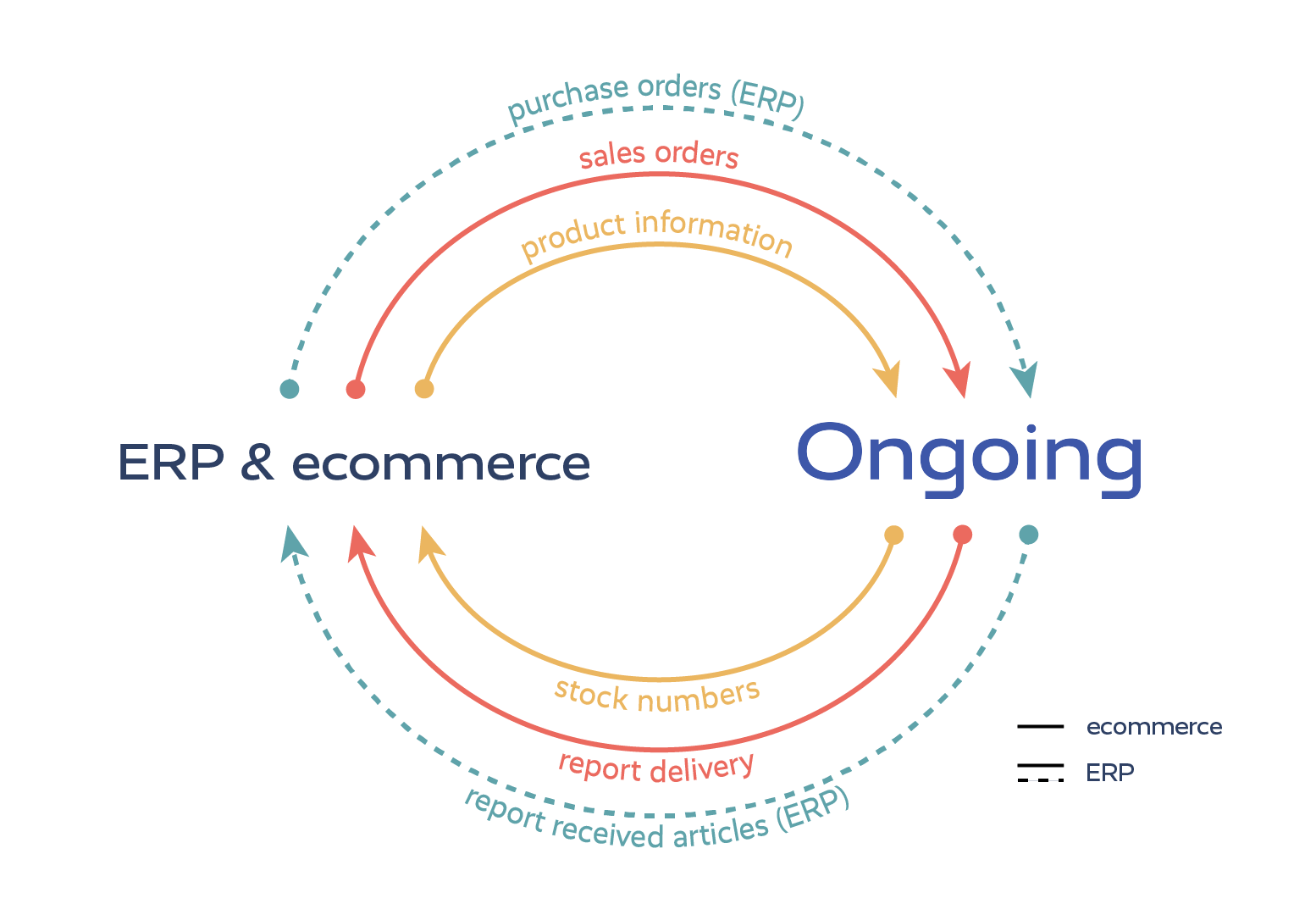
Integrations transfer data automatically between the systems and thereby reduce manual work and sources of error. The image below shows which data that can be transferred between the systems. There may be differences depending on which webshop or ERP system you are using. The details of what is included for each integration is available on the page of existing integrations.
Workflow
The web shop or ERP system is the master system for the article register and order data. This means that all information about orders and articles will be transferred to Ongoing WMS. When changes are made in the webshop or ERP system, the integration will update Ongoing WMS accordingly.
Ongoing WMS is the master of the stock balances. The stock balance numbers may be sent from Ongoing WMS to the web shop or ERP system.
Below is the workflow based on the first time the integration is set up.
- Article register and purchase orders are transferred to Ongoing WMS.
-
Received goods are reported:
- Warehouse workers handle the purchase orders and the received amount of articles is reported to the ERP.
- Warehouse workers register all articles received (without purchase orders).
- Stock numbers are synced from Ongoing WMS to the webshop or ERP system.
- Sales orders are synced to Ongoing WMS.
- Warehouse workers pick and send the orders.
- The orders are reported as delivered to the webshop or ERP system.
Does your system have an integration with Ongoing WMS?
Some of the integrations are developed and supported by Ongoing WMS, and some are developed by third parties. Below is a list of all current integrations.
Integrations built by Ongoing can be set up by an administrator of Ongoing WMS, or by using a client login, sometimes known as a goods owner login.
If you are unsure how to set up an integration, contact your representative at Ongoing if you are a direct customer, or contact your logistics provider (3PL) if you are a goods owner and outsource your logistics. The 3PL will be able to help you with the setup and answer any questions you may have.
Ongoing has built and provides integrations with the following ERP systems:
- e-conomic by Visma
- Finago Office (formerly 24SevenOffice)
- Finago Procountor
- Fortnox
- Lemonsoft
- Merit Aktiva
- Nemo by Eseco
- Netvisor
- plentyONE (formerly plentymarkets)
- PowerOffice Go
- Rackbeat
- Specter
- Spiris | Visma
- Tripletex
- Visma.net
Ongoing has built and provides integrations with the following web shops:
- 24Nettbutikk
- Abicart / Textalk
- Adobe Commerce (Magento)
- BigCommerce
- Centra
- Dandomain/team.blue
- MyCashflow
- Mystore (Acendy)
- Norce
- Nordisk e-handel
- PrestaShop
- Quickbutik
- Shopify
- Shopware
- Viskan
- Voog
- Wannafind
- WooCommerce
The following companies have developed their own integrations from their systems to Ongoing WMS:
- Askås
- Attire
- BeX Online
- Brightpearl
- Brink Commerce
- Business NXT
- Chargebee
- Crystallize
- Digitroll
- Digrad Business
- Easyfy
- ECO3 Apogee Storefront
- extend
- Garp
- Geins
- Gung
- Gurusoft
- IFS
- Infor M3
- Jeeves
- Kodmyran
- Mamut
- Microsoft Dynamics 365 Business Central
- Microsoft Dynamics NAV (Navision)
- Monitor
- Multicase
- NetSuite ERP
- Odoo
- Pyramid Business Studio
- Sage X3
- SAP Business One
- SAP S/4HANA
- ScanNet
- SiteSmart
- Smartweb
- SPY System
- Squarespace
- Starweb
- Swell
- Tracezilla
- Traede
- Traede
- TRIMIT
- Uniconta
- Vendre
- Visma Administration
- Visma Business
- Visma Global
- Webflow
- Wikinggruppen (Acendy)
- Winbas
- WiX
- Zedonk
If you don't find your system in the list above, you can develop an integration towards our Goods Owner API.